 SiteSnag
Guides
Snagging report example
A snagging report is the finished document from a snagging inspection of a new or refurbished home. Each fault gets its own entry with photos and the work needed to fix it, framed by a cover page, a summary, pinned floor plans and signatures. The example below goes through each section in order.
Updated 19 October 2026
Who reads a snagging report
The homebuyer gets the report first, then they or their inspector send it to the developer’s customer care team, who pass the items on to the site manager and the trades. Because it may be read by someone who has never seen the house, each item has to make sense on its own.
A snagging report is different from a snag list template filled in by hand. The list is the raw record of faults, while the report adds the property details, a summary, plans and signatures and is laid out to be read by someone else. If you’re new to the subject, start with what snagging means and when to do it.
A snagging report example, section by section
1. Cover page
The cover identifies the property, the date of the inspection and the type of visit, such as a first inspection or a re-inspection. It names the inspector or surveying firm and the client. Those two should be shown as separate parties, because a cover that runs the inspector’s firm and the buyer’s name together reads as one name and confuses the developer. A logo and a photo of the front of the property make it easy to find the report in a busy inbox.
2. Summary
The summary gives the reader the picture before the detail. It states how many snags were found and breaks them down by severity, and many reports also break them down by trade or by room. A developer’s customer care team will look here first to judge how many visits the repairs will take, and a buyer will look here to see whether anything is serious.
3. Floor plan with pins
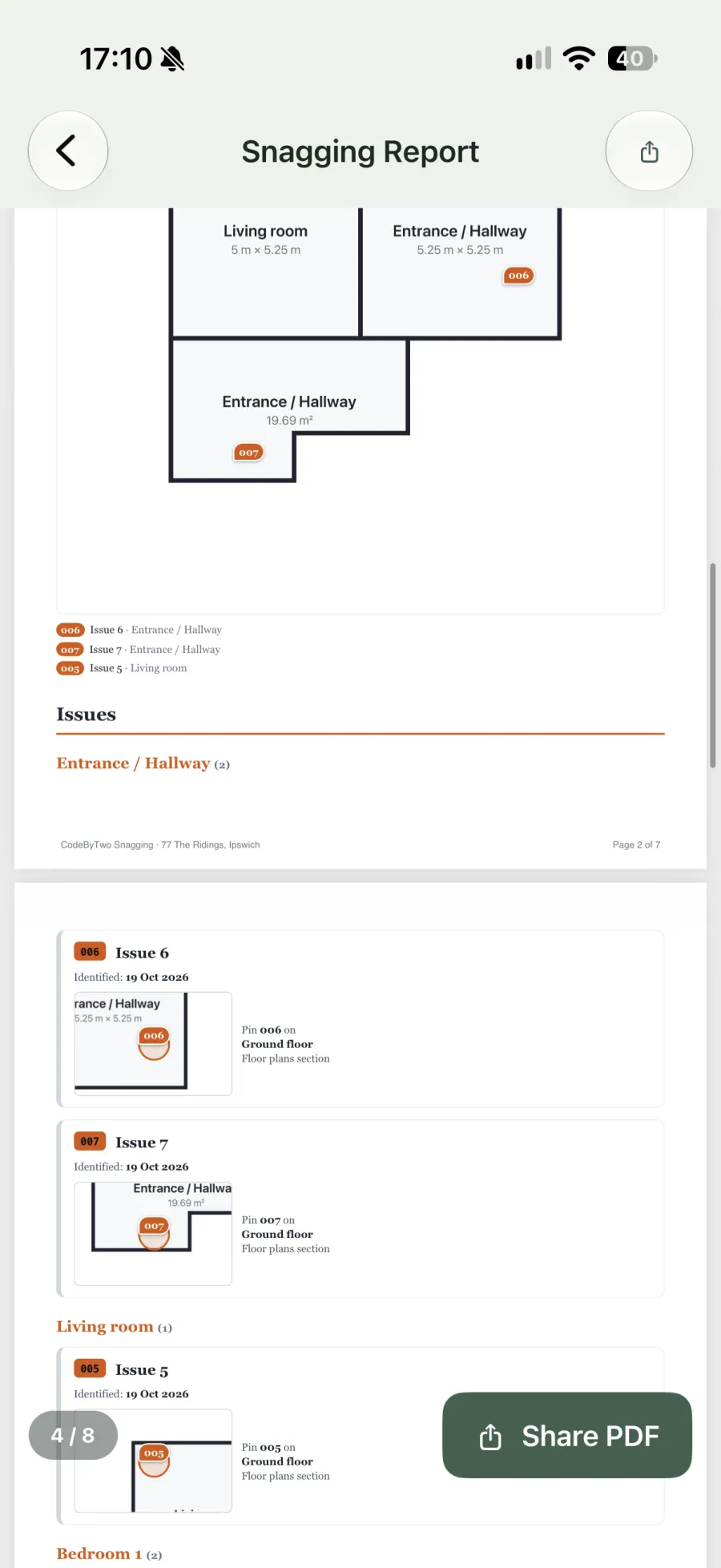
A plan of each floor with a numbered pin for every snag tells the site team exactly where to go. Pins solve the problem of a description like “socket not working” in a room with six sockets. The plan doesn’t need to be an architect’s drawing, because a simple sketch of the rooms in the right layout does the job.
4. The snags
This is the body of the report, with one entry per snag. Each entry has the number that matches the pin on the plan, along with the room and a short title. Then come the photos, the description, the severity, the trade responsible and, where it applies, the standard the item fails. Here is an entry from the SiteSnag defect library, worded the way an inspector would write it:
| Title | Fire door not self-closing |
|---|---|
| Description | Fire door does not fully close under its own closer. Adjust closer so door closes and latches. |
| Severity | Safety |
| Trade | Carpenter / Joiner |
| Standard | Approved Document B |
Photos carry most of the weight. A close-up shows the fault, while a wider shot shows where it is, and an arrow or circle drawn on the photo stops anyone looking at the wrong thing. The description should say what is wrong and what needs doing, in that order, so the trade knows the job before arriving. Our list of common new build defects gives the wording and trade for 460+ typical items, most of them with a reference.
5. Checklists
A report can include the checklist the inspector worked through, showing each item as passed, failed or not applicable. That shows the whole house was covered and records what was checked and found to be fine, which helps if a dispute comes up later. The new build snagging checklist is a good starting point, and the handover checklist covers documents, keys and meter readings.
6. Findings and conclusion
A short closing section sums up the condition of the property in plain words. It points out anything that needs urgent attention and sets out what should happen next, which in most cases is that the builder fixes the items and the inspector returns to check them. Keep opinions here separate from the snag entries.
7. Signatures
Signatures from the inspector, and sometimes the client or the site manager, record who was present and that the report is the agreed record of the visit. They are especially useful on a handover or a re-inspection, where both sides are agreeing which items are closed.
Re-inspection reports
After the builder has done the repairs, the inspector goes back and checks every item. A good re-inspection report keeps the original numbers and marks each snag as fixed, partly fixed or not fixed, with new photos where something is still wrong. Showing the history of each snag across visits saves the developer from comparing two separate reports side by side.
What a SiteSnag snagging report includes
SiteSnag is a snagging app for UK inspectors and surveyors that builds the report on your phone as you inspect, so the PDF is ready before you leave site. The report options are:
- Four report styles, with your logo, an accent colour, a choice of three fonts, page numbers and a footer.
- A cover page that shows the surveyor and the client separately, followed by a summary.
- Floor plans with numbered pins that match the snag numbers. Plans are drawn in the app by tapping corners or imported from an image.
- Snags sorted and grouped by area, severity, trade or status, with 1, 2, 4, 6 or 9 photos per snag or all of them.
- Photo mark-up with arrows, circles, boxes, text, measurements and numbered markers, which stays editable after saving.
- An optional checklist section, signatures and QR codes.
- Initial, re-inspection and handover visits, with the fixed, partly fixed or not fixed history included in the report if you want it.
Wording comes from a library of 460+ UK defects with NHBC chapter references, Approved Documents and BS 7671, and you can add your own. Past reports are kept with each survey, and the finished PDF is sent through the phone’s share sheet using Mail, Outlook, WhatsApp or any other app. You can also rename 26 terms, such as calling a snag a defect or an issue, and the change carries through to the PDF. There’s more on the snagging app for inspectors page, and the plans are in the pricing section.
Frequently asked questions
How long should a snagging report be?
There is no set length, as long as every snag has its own entry with a photo and a clear description. Page count depends far more on the number of snags and photos than on the size of the house, so a small flat in poor condition can produce a longer report than a large detached home.
Is a snagging report the same as a RICS Home Survey?
No. A RICS Home Survey reports on the condition of a property for someone deciding whether to buy it. A snagging report lists faults in a new or refurbished build so the builder can put them right.
Should a snagging report quote building standards?
It helps for anything the builder might dispute. A reference to a chapter of the NHBC Standards or an Approved Document shows the item is more than a matter of taste.
Can I make a snagging report on my phone?
Yes. A snagging app such as SiteSnag records each snag with its photos as you walk round and produces the PDF report on the phone, without going back to a desk.